Introduction –
This is a gateway to accessing a lot of settings that most Android users don’t know about. You can change things like the maximum number of connected Bluetooth devices at once, or modify the background processes limit so your phone doesn’t take on too much at once. Developer options give you power-user control over your device, but be careful not to mess with anything you don’t understand, as some settings could seriously mess up your phone’s setup.
How to enable –
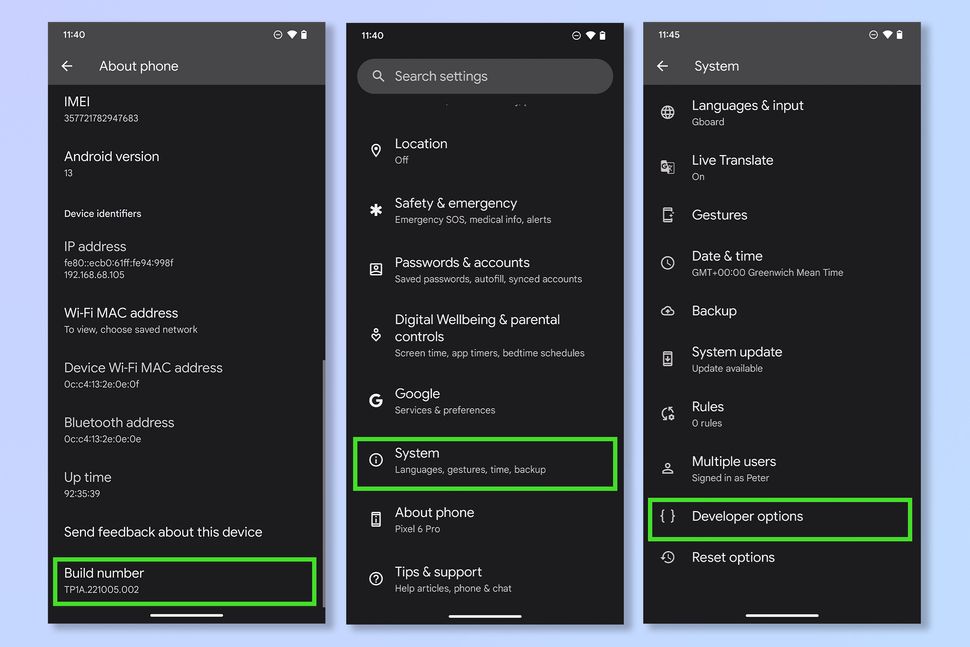
1. Open the settings app and tap about phone, then tap build number 7 times.
2. Enter your passcode and then return to the settings menu. Tap System Settings and then Developer Options.
(On a Samsung device, tap Software information, then tap Build number 7 times).

 Computer1w