Introduction –
Personalized ads are one of the biggest bugbears in modern life and, while you can’t avoid them everywhere, deleting cookies from your phone’s browser is a great way to take back your privacy. The name cookies may sound harmless but this is actually code for trackers, which will gather data about your usage. Thankfully, on Android, it’s easy to delete cookies on Chrome.
How to enable –
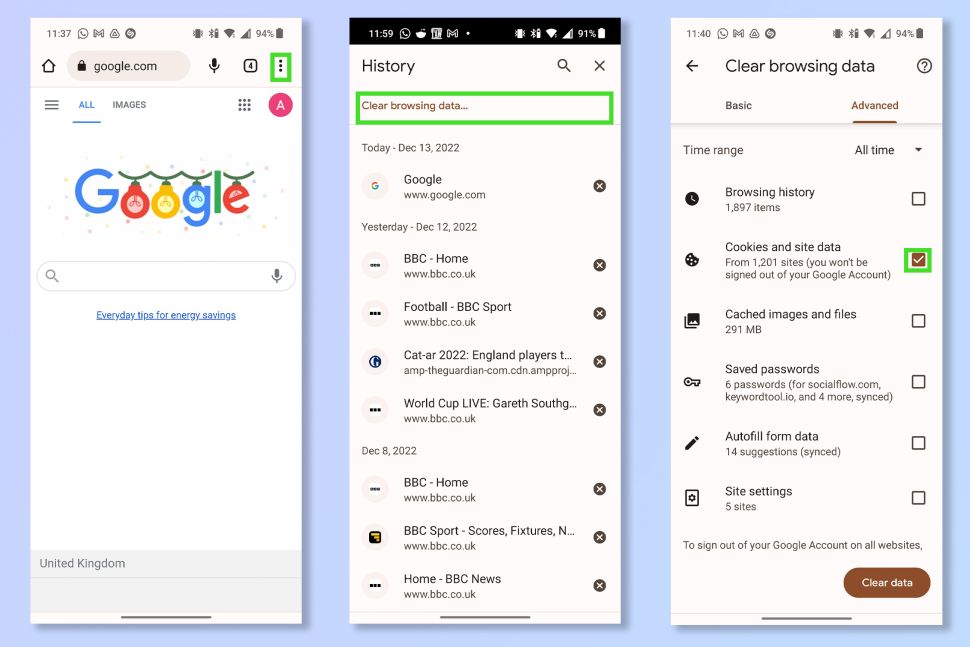
1. On Chrome, tap the three dots in the corner, then tap history. Now tap Clear browsing data.
2. To delete every cookie, select the Time range box and tap All time. Now select the Cookies and site data tick box and tap Clear data.
Read our full guide on how to clear cookies on Android.

 Computer1w